
AWS Certified Solutions Architect Associate · Free Practice Question Medium
Question 41
An e-commerce company runs its web application on Amazon EC2 instances in an Auto Scaling group and it's configured to handle consumer orders in an Amazon Simple Queue Service (Amazon SQS) queue for downstream processing. The DevOps team has observed that the performance of the application goes down in case of a sudden spike in orders received.
As a solutions architect, which of the following solutions would you recommend to address this use-case?
-
A
Use a scheduled scaling policy based on a custom Amazon SQS queue metric
-
B
Use a step scaling policy based on a custom Amazon SQS queue metric
-
C
Use a target tracking scaling policy based on a custom Amazon SQS queue metric
-
D
Use a simple scaling policy based on a custom Amazon SQS queue metric
Reveal correct answer
Correct answer: C
Explanation
Correct option:
Use a target tracking scaling policy based on a custom Amazon SQS queue metric
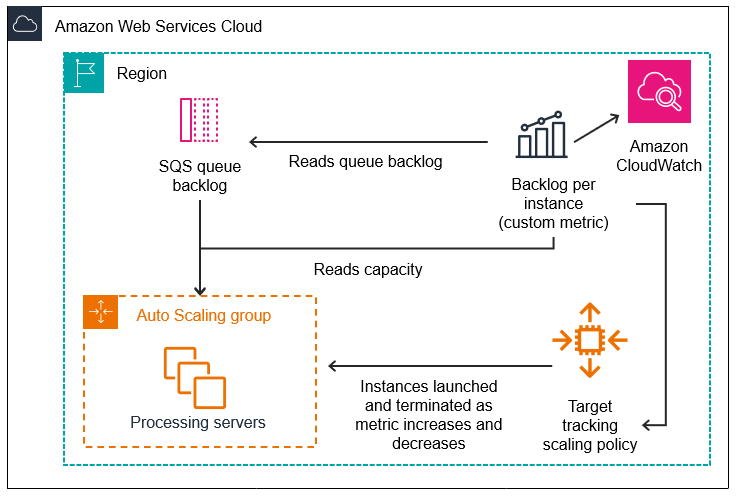
If you use a target tracking scaling policy based on a custom Amazon SQS queue metric, dynamic scaling can adjust to the demand curve of your application more effectively. You may use an existing CloudWatch Amazon SQS metric like ApproximateNumberOfMessagesVisible for target tracking but you could still face an issue so that the number of messages in the queue might not change proportionally to the size of the Auto Scaling group that processes messages from the queue. The solution is to use a backlog per instance metric with the target value being the acceptable backlog per instance to maintain.
To calculate your backlog per instance, divide the ApproximateNumberOfMessages queue attribute by the number of instances in the InService state for the Auto Scaling group. Then set a target value for the Acceptable backlog per instance.
To illustrate with an example, let's say that the current ApproximateNumberOfMessages is 1500 and the fleet's running capacity is 10. If the average processing time is 0.1 seconds for each message and the longest acceptable latency is 10 seconds, then the acceptable backlog per instance is 10 / 0.1, which equals 100. This means that 100 is the target value for your target tracking policy. If the backlog per instance is currently at 150 (1500 / 10), your fleet scales out, and it scales out by five instances to maintain proportion to the target value.
Scaling Based on Amazon SQS:
Incorrect options:
Use a simple scaling policy based on a custom Amazon SQS queue metric - With simple scaling, you choose scaling metrics and threshold values for the Amazon CloudWatch alarms that trigger the scaling process. The main issue with simple scaling is that after a scaling activity is started, the policy must wait for the scaling activity or health check replacement to complete and the cooldown period to expire before responding to additional alarms. This implies that the application would not be able to react quickly to sudden spikes in orders.
Use a step scaling policy based on a custom Amazon SQS queue metric - With step scaling, you choose scaling metrics and threshold values for the Amazon CloudWatch alarms that trigger the scaling process. When step adjustments are applied, they increase or decrease the current capacity of your Auto Scaling group, and the adjustments vary based on the size of the alarm breach. For the given use-case, step scaling would try to approximate the correct number of instances by increasing/decreasing the steps as per the policy. This is not as efficient as the target tracking policy where you can calculate the exact number of instances required to handle the spike in orders.
Use a scheduled scaling policy based on a custom Amazon SQS queue metric - Scheduled scaling allows you to set your scaling schedule. For example, let's say that every week the traffic to your web application starts to increase on Wednesday, remains high on Thursday, and starts to decrease on Friday. You can plan your scaling actions based on the predictable traffic patterns of your web application. Scaling actions are performed automatically as a function of time and date. You cannot use scheduled scaling policies to address the sudden spike in orders.
Reference:
https://docs.aws.amazon.com/autoscaling/ec2/userguide/as-using-sqs-queue.html
Discussion
Think the marked answer is wrong, or have a better explanation? Share it below — comments appear after review.

