
AWS Certified Security Specialty · Free Practice Question Medium
Question 10
The latest guidelines issued by the security team at a company mandate an application to block HTTP requests that don't have a User-Agent header or have a specific User-Agent in the request.
How will you block these requests using AWS WAF?
-
A
Block requests that contain a specific User-Agent in the request using AWS Managed Rules. Block requests that don’t contain a User-Agent header using either AWS Managed Rules or custom rules
-
B
Block requests that contain a specific User-Agent in the request using AWS Managed Rules. Block requests that don’t contain a User-Agent header using security group rules
-
C
Block requests that contain a specific User-Agent in the request using custom Rules. Block requests that don’t contain a User-Agent header using either AWS Managed Rules or custom rules
-
D
Block requests that contain a specific User-Agent in the request using custom rules. Block requests that don’t contain a User-Agent header using security group rules
Reveal correct answer
Correct answer: C
Explanation
Correct option:
Block requests that contain a specific User-Agent in the request using custom Rules. Block requests that don’t contain a User-Agent header using either AWS Managed Rules or custom rules
By default, AWS WAF filters don't check whether the HTTP request parameters are present or not. To check whether the HTTP request parameters are present or not, do the following:
Block requests that don't contain a User-Agent header using AWS Managed Rules.
-or-
Block requests that don't contain a User-Agent header or block traffic if the requests contain a specific User-Agent using custom rules.
The following rules inspect requests missing the HTTP User-Agent header and User-Agent strings that don't seem to be from a web browser:
NoUserAgent_HEADER This rule is from the Core rule set (CRS) managed rule group. This rule inspects for requests that are missing the HTTP User-Agent header.
SignalNonBrowserUserAgent This rule is from the AWS WAF Bot Control rule group. This rule inspects for User-Agent strings that don't seem to be from a web browser including requests with no User-Agent.
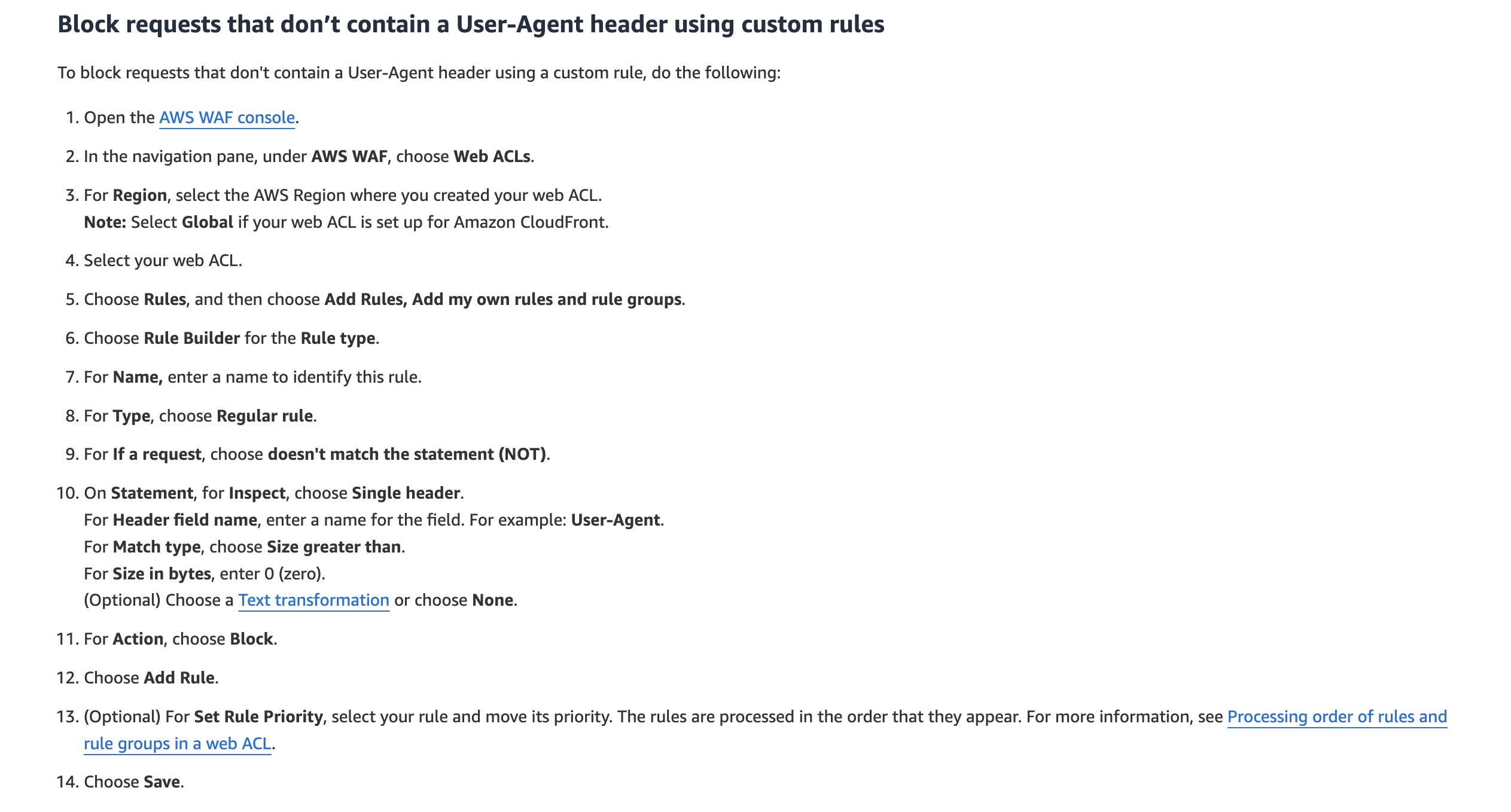
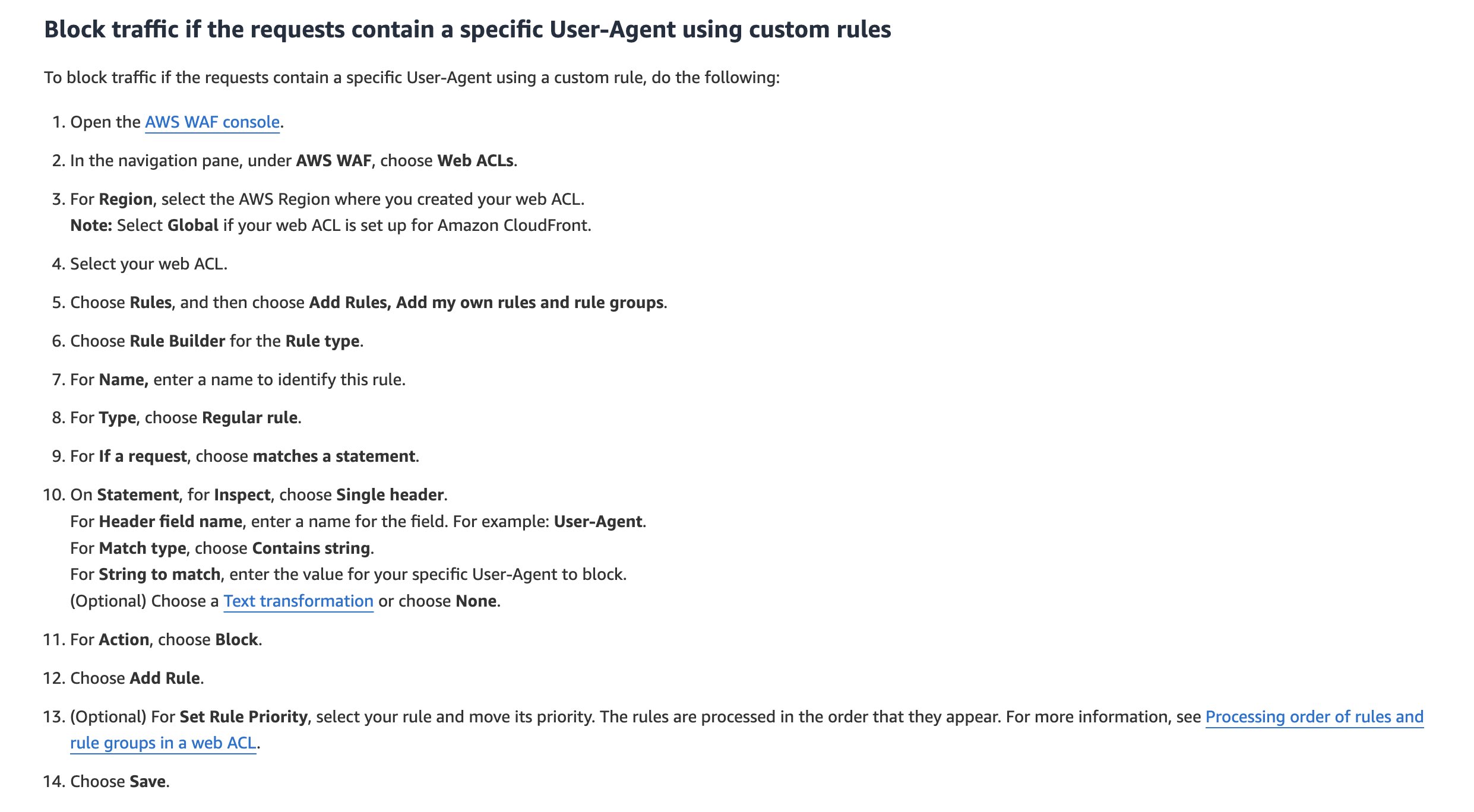
Incorrect options:
Block requests that contain a specific User-Agent in the request using AWS Managed Rules. Block requests that don’t contain a User-Agent header using security group rules
Block requests that contain a specific User-Agent in the request using custom rules. Block requests that don’t contain a User-Agent header using security group rules
These two options have been added as distractors. Security group rules cannot be associated with a WAF. You should also note that security group rules can only allow requests.
Block requests that contain a specific User-Agent in the request using AWS Managed Rules. Block requests that don’t contain a User-Agent header using either AWS Managed Rules or custom rules - AWS Managed Rules can only be used to block requests that don’t contain a User-Agent header. You cannot use the AWS Managed Rules to block requests that contain a specific User-Agent.
References:
https://aws.amazon.com/premiumsupport/knowledge-center/waf-block-http-requests-no-user-agent/
Discussion
Think the marked answer is wrong, or have a better explanation? Share it below — comments appear after review.

