
AWS Certified Machine Learning Engineer Associate · Free Practice Question Medium
Question 9
You are responsible for deploying a machine learning model on AWS SageMaker for a real-time prediction application. The application requires low latency and high throughput. During deployment, you notice that the model’s response time is slower than expected, and the throughput is not meeting the required levels. You have already optimized the model itself, so the next step is to optimize the deployment environment. You are currently using a single instance of the ml.m5.large instance type with the default endpoint configuration.
Which of the following changes is MOST LIKELY to improve the model’s response time and throughput?
-
A
Increase the instance count to two and enable asynchronous inference
-
B
Switch to an
ml.m5.2xlargeinstance type and use multi-AZ deployment -
C
Enable Auto Scaling with a target metric for the instance utilization
-
D
Change the instance type to
ml.p2.xlargeand add multi-model support
Reveal correct answer
Correct answer: C
Explanation
Correct option:
Enable Auto Scaling with a target metric for the instance utilization
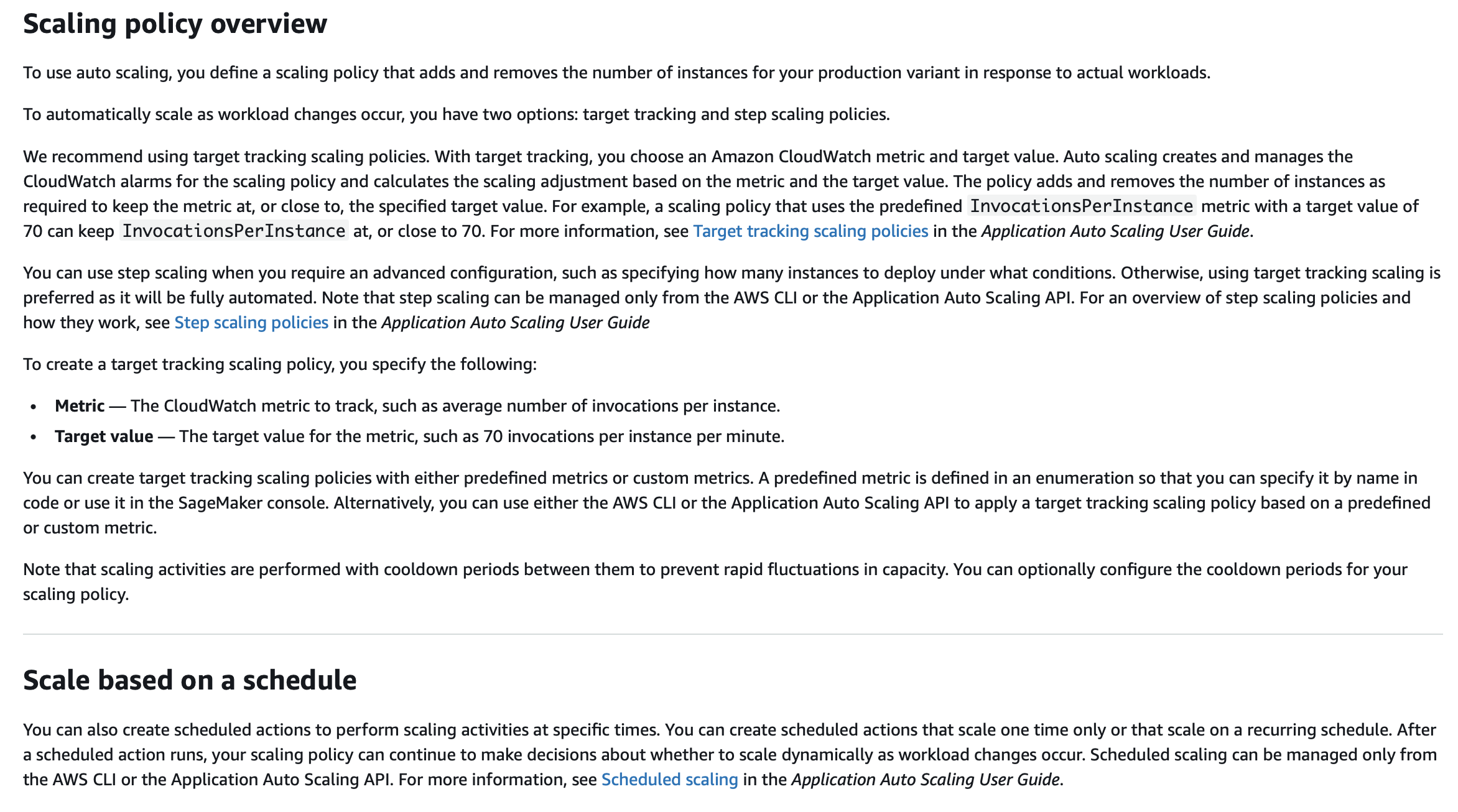
Amazon SageMaker supports automatic scaling (auto scaling) for your hosted models. Auto scaling dynamically adjusts the number of instances provisioned for a model in response to changes in your workload. When the workload increases, auto scaling brings more instances online. When the workload decreases, auto scaling removes unnecessary instances so that you don't pay for provisioned instances that you aren't using.
Enabling Auto Scaling allows the endpoint to dynamically adjust the number of instances based on actual traffic. By targeting instance utilization, the deployment can automatically scale out during peak times and scale in during low demand, improving both response time and throughput without over-provisioning. With target tracking, you choose an Amazon CloudWatch metric and target value. Auto scaling creates and manages the CloudWatch alarms for the scaling policy and calculates the scaling adjustment based on the metric and the target value. The policy adds and removes the number of instances as required to keep the metric at, or close to, the specified target value. For example, a scaling policy that uses the predefined InvocationsPerInstance metric with a target value of 70 can keep InvocationsPerInstance at, or close to 70.
Incorrect options:
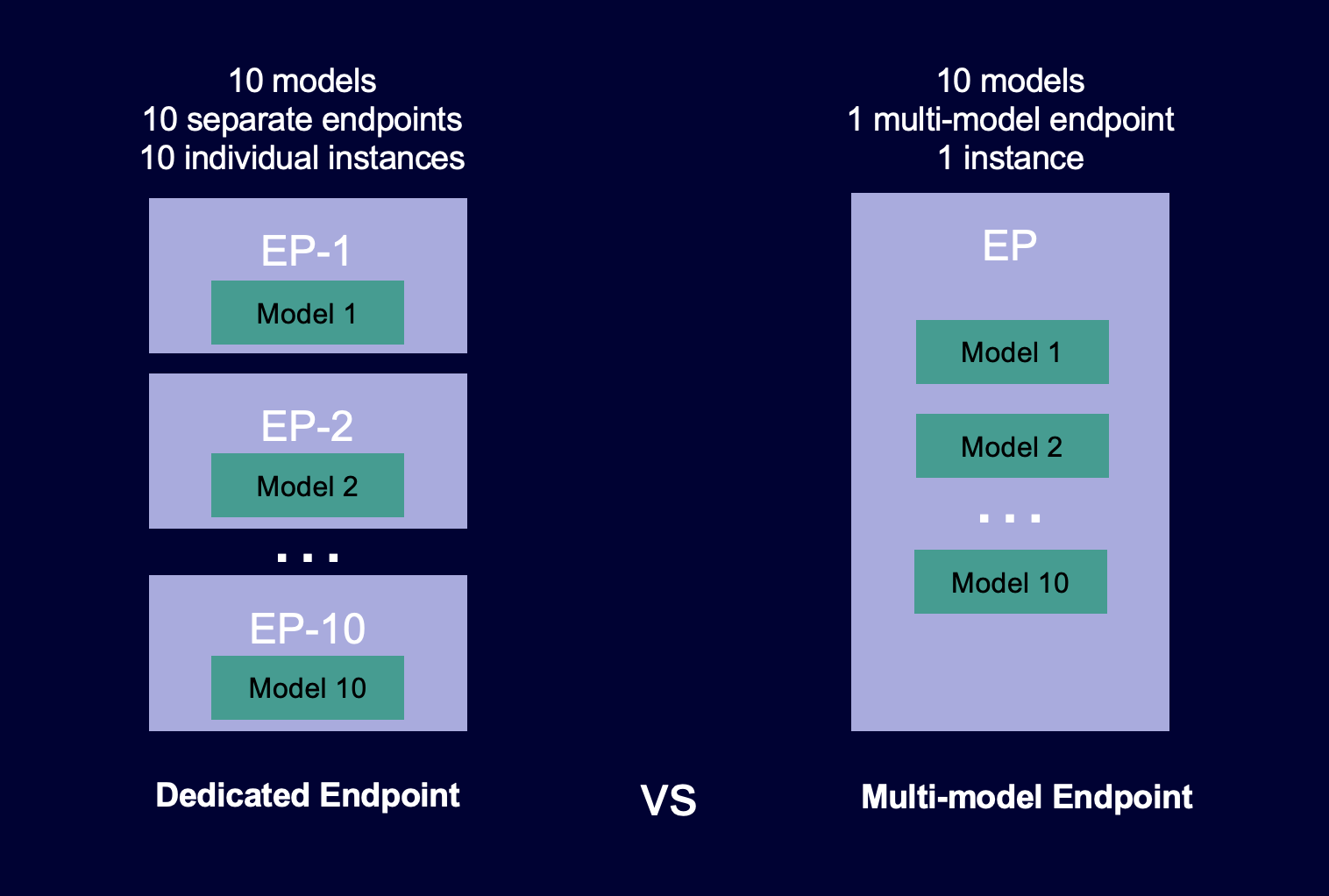
Change the instance type to ml.p2.xlarge and add multi-model support - While changing to an ml.p2.xlarge instance type, which is optimized for GPU, could improve performance for compute-intensive models, it may not be necessary for all types of models, especially if the model is CPU-bound. Adding multi-model support may further complicate the deployment without addressing the core issue of latency and throughput. Multi-model endpoints provide a scalable and cost-effective solution to deploying large numbers of models. They use the same fleet of resources and a shared serving container to host all of your models. This reduces hosting costs by improving endpoint utilization compared with using single-model endpoints. It also reduces deployment overhead because Amazon SageMaker manages loading models in memory and scaling them based on the traffic patterns to your endpoint.
The following diagram shows how multi-model endpoints work compared to single-model endpoints.
Increase the instance count to two and enable asynchronous inference - Asynchronous inference is typically used when latency is less of a concern, which contradicts the requirements of real-time prediction. Increasing the instance count without addressing scalability could help throughput but may not effectively reduce latency.
Switch to an ml.m5.2xlarge instance type and use multi-AZ deployment - Switching to a more powerful ml.m5.2xlarge instance type and using multi-AZ deployment could improve performance, but this option mainly adds redundancy and fault tolerance rather than optimizing response time and throughput directly.
References:
https://docs.aws.amazon.com/sagemaker/latest/dg/endpoint-auto-scaling-prerequisites.html
https://docs.aws.amazon.com/sagemaker/latest/dg/multi-model-endpoints.html
Discussion
Think the marked answer is wrong, or have a better explanation? Share it below — comments appear after review.

