
AWS Certified Machine Learning Engineer Associate · Free Practice Question Medium
Question 38
A company is using a fleet of Amazon EC2 instances to ingest data from on-premises data sources. The data is in JSON format and ingestion rates can be as high as 1 MB/s. When an EC2 instance is rebooted, the data in flight is lost. The company’s data science team wants to query ingested data in near-real time.
Which solution provides near-real-time data querying that is scalable with minimal data loss?
-
A
Publish data to Amazon Kinesis Data Streams, use Kinesis Data Analytics to query the data
-
B
Store ingested data in an Amazon Elastic Block Store (Amazon EBS) volume. Write to Amazon S3 bucket and use Amazon Redshift Spectrum to query the data
-
C
Store ingested data in an EC2 instance store. Publish data to Amazon Kinesis Data Firehose with Amazon S3 as the destination. Use Amazon Athena to query the data
-
D
Store ingested data in an Amazon Elastic Block Store (Amazon EBS) volume. Publish data to Amazon ElastiCache for Redis. Subscribe to the Redis channel to query the data
Reveal correct answer
Correct answer: A
Explanation
Correct option:
Publish data to Amazon Kinesis Data Streams, use Kinesis Data Analytics to query the data
With Amazon Kinesis Data Analytics for SQL Applications, you can process and analyze streaming data using standard SQL. The service enables you to quickly author and run powerful SQL code against streaming sources to perform time series analytics, feed real-time dashboards, and create real-time metrics.
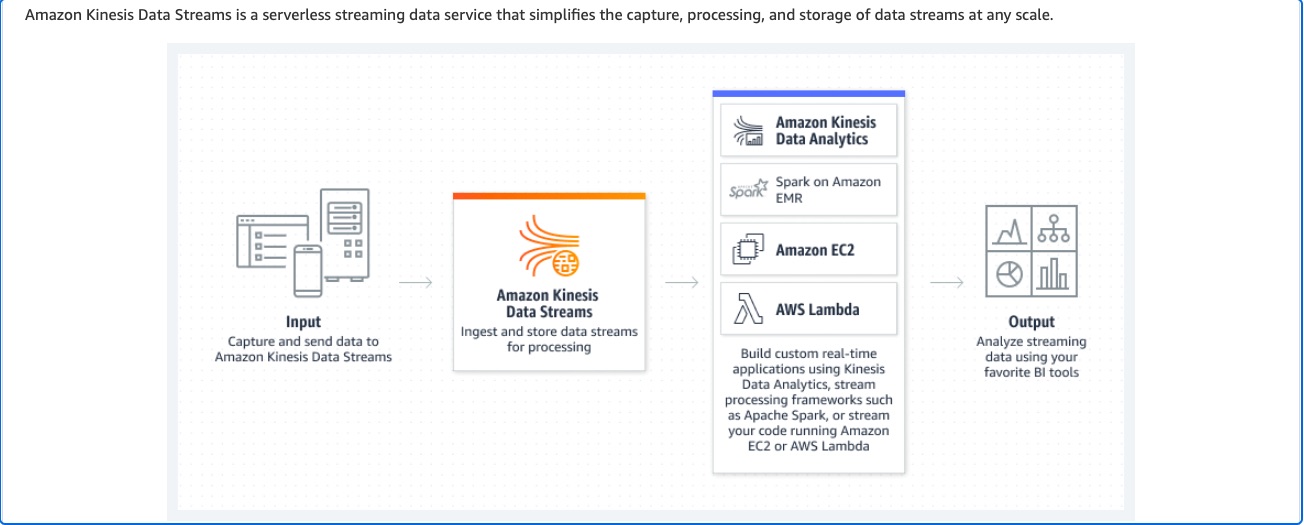
To get started with Kinesis Data Analytics, you create a Kinesis Data Analytics application that continuously reads and processes streaming data. The service supports ingesting data from Amazon Kinesis Data Streams and Amazon Data Firehose streaming sources. Kinesis Data Analytics supports Amazon Data Firehose (Amazon S3, Amazon Redshift, Amazon OpenSearch Service, and Splunk), AWS Lambda, and Amazon Kinesis Data Streams as destinations.
Kinesis Data Stream and Kinesis Data Analytics:
Incorrect options:
Store ingested data in an Amazon Elastic Block Store (Amazon EBS) volume. Publish data to Amazon ElastiCache for Redis. Subscribe to the Redis channel to query the data
Store ingested data in an Amazon Elastic Block Store (Amazon EBS) volume. Write to Amazon S3 bucket and use Amazon Redshift Spectrum to query the data
Amazon Elastic Block Store (EBS) is not typically used for streaming data. EBS is designed as block-level storage for use with Amazon EC2 instances, providing persistent storage that remains available independent of the lifecycle of the EC2 instance. It is ideal for workloads requiring consistent and low-latency storage performance, such as databases, file systems, and applications that need block storage. Therefore, both these options are incorrect.
Store ingested data in an EC2 instance store. Publish data to Amazon Kinesis Data Firehose with Amazon S3 as the destination. Use Amazon Athena to query the data - The instance store is temporary storage and the data will be lost when the EC2 instance reboots.
References:
https://docs.aws.amazon.com/kinesisanalytics/latest/dev/what-is.html
https://repost.aws/questions/QUpj1ciWvKTfCN8UGJ-UdqnQ/kinesis-data-ingestion
Discussion
Think the marked answer is wrong, or have a better explanation? Share it below — comments appear after review.

