
AWS Certified Devops Engineer Professional · Free Practice Question Medium
Question 8
A media company extensively uses Amazon S3 buckets for storing images files, documents, and other business-specific data. The company has mandated enabling logging for all Amazon S3 buckets. The audit team publishes the reports of all AWS resources failing company security standards. Until recently, the security team would pick the list of noncompliant Amazon S3 buckets from the audit list and execute remediation actions manually for each resource. This process is not only time-consuming but also leaves noncompliant resources vulnerable for a long duration.
Which combination of steps should a DevOps Engineer take to meet these requirements using an automated solution? (Select two)
-
A
While setting up remediation action, pass the resource ID of non-compliant resources to the remediation action. This configuration is mandatory for auto-remediation to work
-
B
Configure AWS Config Auto Remediation for the AWS Config rule
s3-bucket-logging-enabled. From the remediation action list choose AWS Lambda to implement a custom function that will enable S3 logging for the S3 bucket ID passed -
C
Configure AWS Config Auto Remediation for the AWS Config rule
s3-bucket-logging-enabled. From the remediation action list chooseAWS-ConfigureS3BucketLogging -
D
Configure AWS Config Auto Remediation for the AWS Config rule
s3-logging-enabled. Create your own custom remediation action using AWS Systems Manager Automation documents to enable logging on the S3 bucket -
E
The
AutomationAssumeRolein the remediation action parameters should be assumable by SSM. The user must have pass-role permissions for that role when they create the remediation action in AWS Config
Reveal correct answers
Correct answers: C, E
Explanation
Correct options:
Configure AWS Config Auto Remediation for the AWS Config rule s3-bucket-logging-enabled. From the remediation action list choose AWS-ConfigureS3BucketLogging
The AutomationAssumeRole in the remediation action parameters should be assumable by SSM. The user must have pass-role permissions for that role when they create the remediation action in AWS Config
The AWS Config Auto Remediation feature automatically remediates non-compliant resources evaluated by AWS Config rules. You can associate remediation actions with AWS Config rules and choose to execute them automatically to address non-compliant resources without manual intervention. You can:
- Choose the remediation action you want to associate from a pre-populated list.
- Create your own custom remediation actions using AWS Systems Manager Automation documents.
If a resource is still non-compliant after auto-remediation, you can set the rule to try auto-remediation again.
For the above use case: You must have AWS Config enabled in your AWS account. The AutomationAssumeRole in the remediation action parameters should be assumable by SSM. The user must have pass-role permissions for that role when they create the remediation action in AWS Config, and that role must have whatever permissions the SSM document requires.
Steps to set up Auto Remediation for s3-bucket-logging-enabled:
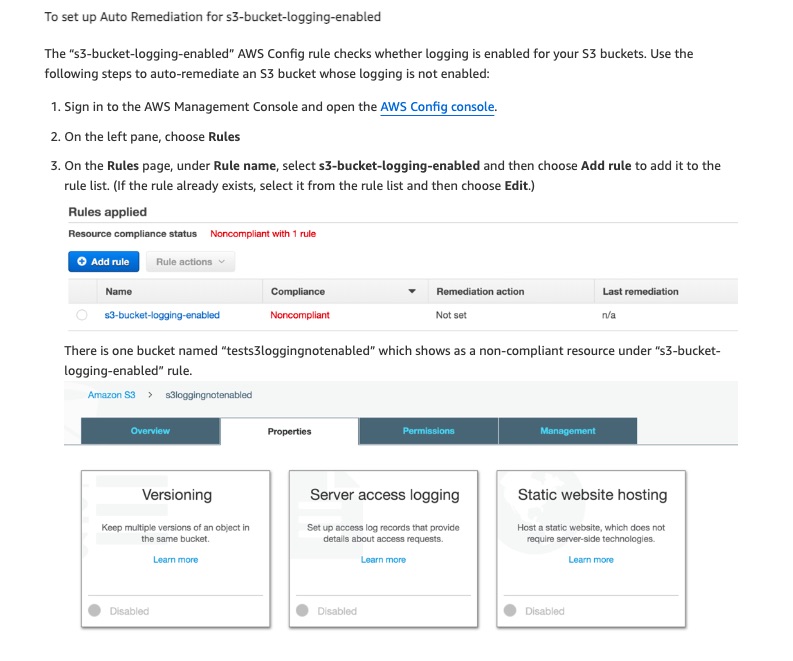
Incorrect options:
Configure AWS Config Auto Remediation for the AWS Config rule s3-logging-enabled. Create your own custom remediation action using AWS Systems Manager Automation documents to enable logging on the S3 bucket - While you can create a custom remediation action using SSM, for this particular use case, it is not required since auto-remediation for S3 server logging is already present in the remediation action list of AWS Config rules.
Configure AWS Config Auto Remediation for the AWS Config rule s3-bucket-logging-enabled. From the remediation action list choose AWS Lambda to implement a custom function that will enable S3 logging for the S3 bucket ID passed - As discussed above, the AWS config remediation action pre-populated list already has an action defined for enabling S3 logging. Hence, custom code is unnecessary for this use case.
While setting up remediation action, pass the resource ID of non-compliant resources to the remediation action. This configuration is mandatory for auto-remediation to work- While setting up remediation action if you want to pass the resource ID of non-compliant resources to the remediation action, choose the Resource ID parameter. If selected at runtime, the parameter is substituted with the ID of the resource to be remediated. This is not mandatory though.
Reference:
https://aws.amazon.com/blogs/mt/aws-config-auto-remediation-s3-compliance/
Discussion
Think the marked answer is wrong, or have a better explanation? Share it below — comments appear after review.

