
AWS Certified Devops Engineer Professional · Free Practice Question Medium
Question 11
A company having hundreds of AWS accounts manages its operations and security through a single organization created in AWS Organizations. As per the company's policy, AWS Config and AWS CloudTrail are enabled for all accounts. The security policy mandates configuring AWS Web Application Firewall (AWS WAF) web ACLs for all internet-facing Application Load Balancers (ALBs) and Amazon API Gateway APIs. However, monthly audit reports consistently report unsecured ALBs and API Gateway APIs.
As a DevOps engineer, the security team has requested you to automate these configurations for all accounts to avoid oversight. What steps will you recommend?
-
A
Create an Amazon GuardDuty policy to attach AWS WAF web ACLs to any newly created ALBs and API Gateway APIs
-
B
Configure a managed rule in AWS Config to attach AWS WAF web ACLs to any newly created ALBs and API Gateway APIs
-
C
Create an Amazon Systems Manager policy to attach AWS WAF web ACLs to any newly created ALBs and API Gateway APIs
-
D
Designate one of the AWS accounts in your organization as the administrator for Firewall Manager in AWS Organizations. Create an AWS Firewall Manager policy to attach AWS WAF web ACLs to any newly created ALBs and API Gateway APIs
Reveal correct answer
Correct answer: D
Explanation
Correct option:
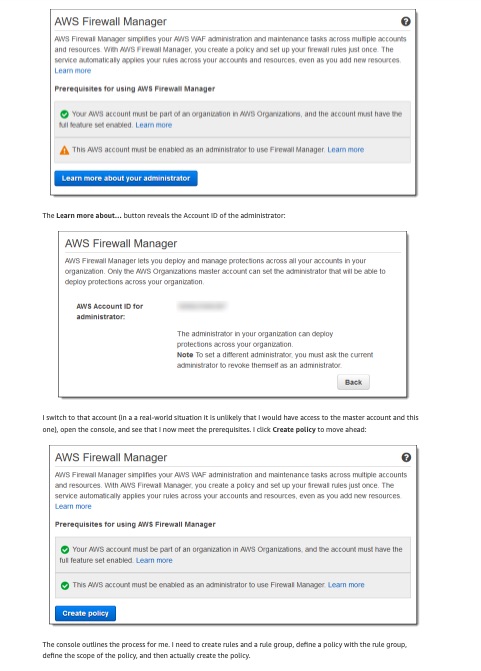
AWS Firewall Manager offers the freedom to use multiple AWS accounts and to host applications in any desired region while maintaining centralized control over their organization’s security settings and profile. Developers can develop and innovators can innovate, while the security team gains the ability to respond quickly, uniformly, and globally to potential threats and actual attacks.
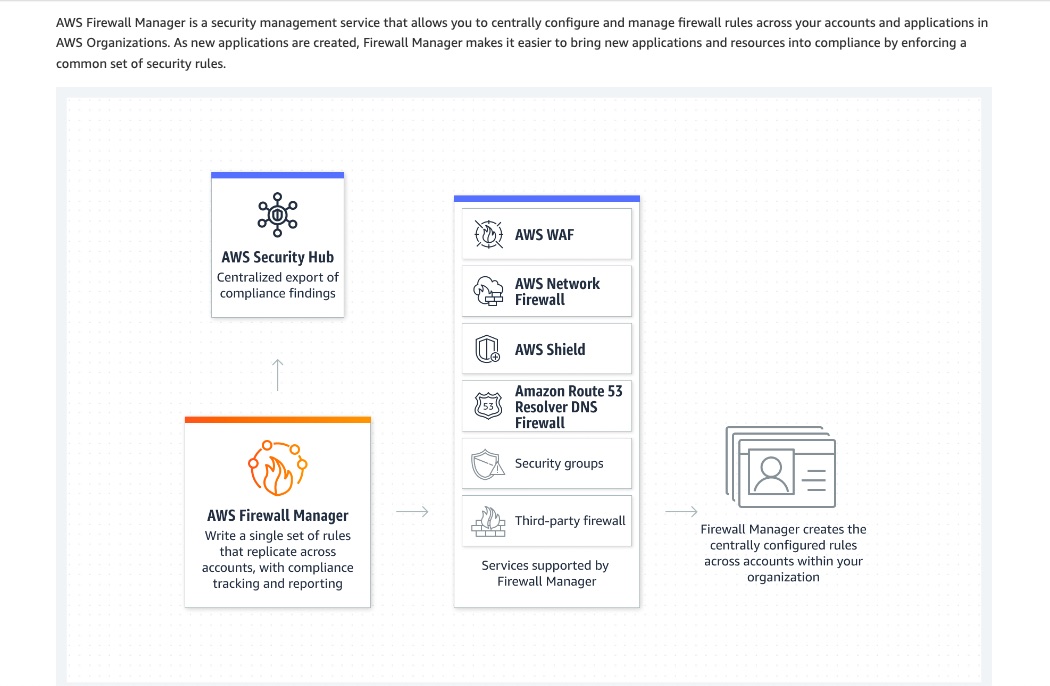
Firewall Manager is built around named policies that contain WAF rule sets and optional AWS Shield advanced protection. Each policy applies to a specific set of AWS resources, specified by account, resource type, resource identifier, or tag. Policies can be applied automatically to all matching resources, or to a subset that you select. Policies can include WAF rules drawn from within the organization, and also those created by AWS Partners such as Imperva, F5, Trend Micro, and other AWS Marketplace vendors. This gives your security team the power to duplicate their existing on-premises security posture in the cloud.
Firewall Manager has three prerequisites:
AWS Organizations – Your organization must be using AWS Organizations to manage your accounts and all features must be enabled.
Firewall Administrator – You must designate one of the AWS accounts in your organization as the administrator for Firewall Manager. This gives the account permission to deploy AWS WAF rules across the organization.
AWS Config – You must enable AWS Config for all of the accounts in the Organization so that Firewall Manager can detect newly created resources.
Using AWS Firewall Manager to centrally manage your Web Application Portfolio:
Incorrect options:
Create an Amazon GuardDuty policy to attach AWS WAF web ACLs to any newly created ALBs and API Gateway APIs - Amazon GuardDuty can automatically update the AWS Web Application Firewall Web Access Control Lists (WebACLs) and VPC Network Access Control Lists (NACLs) in response to GuardDuty findings. But, Amazon GuardDuty is a continuous security monitoring and threat detection service and not a security management service like AWS Firewall Manager. Even though GuardDuty can update web ACLs, it's a reaction to a threat. It cannot be used to proactively define rules for web ACLs across accounts to centrally manage the security infrastructure of an organization.
Configure a managed rule in AWS Config to attach AWS WAF web ACLs to any newly created ALBs and API Gateway APIs - Enabling AWS Config is a prerequisite for using AWS Firewall Manager. AWS Config can track the status of resources, but AWS Firewall Manager is needed for centrally managing the security infrastructure.
AWS Firewall Manager and AWS Config:
Create an Amazon Systems Manager policy to attach AWS WAF web ACLs to any newly created ALBs and API Gateway APIs - This option has been added as a distractor and is irrelevant to the given use case.
References:
https://docs.aws.amazon.com/waf/latest/developerguide/get-started-fms-create-security-policy.html
https://docs.aws.amazon.com/waf/latest/developerguide/get-started-fms-create-security-policy.html
Discussion
Think the marked answer is wrong, or have a better explanation? Share it below — comments appear after review.

