
AWS Certified Data Engineer Associate · Free Practice Question Medium
Question 22
A data engineer has configured an AWS Glue job to read data from an Amazon S3 bucket by setting up the AWS Glue connection details and the associated IAM role. However, when the AWS Glue job is run, it fails with an error pointing to the Amazon S3 VPC gateway endpoint that has been configured for accessing the data in Amazon S3.
How should the data engineer troubleshoot this issue?
-
A
Verify that the route table of the VPC has inbound and outbound routes for the Amazon S3 VPC gateway endpoint
-
B
Configure private DNS options for the VPC gateway endpoint
-
C
Configure an Internet Gateway in the VPC for the AWS Glue job to access the Amazon S3 bucket via the public endpoint
-
D
Attach a bucket policy to the S3 bucket that will explicitly grant access permissions to the IAM role associated with the AWS Glue job
Reveal correct answer
Correct answer: A
Explanation
Correct option:
Verify that the route table of the VPC has inbound and outbound routes for the Amazon S3 VPC gateway endpoint
A gateway VPC endpoint enables you to create a private connection between your VPC and another AWS service. When you create a gateway endpoint, you specify the subnet route tables in your VPC that are used by the gateway endpoint. A route is automatically added to each of the route tables with a destination that specifies the prefix list ID of the service (pl-xxxxxxxx), and a target with the endpoint ID (vpce-xxxxxxxxxxxxxxxxx). You cannot explicitly delete or modify the endpoint route, but you can change the route tables that are used by the endpoint.
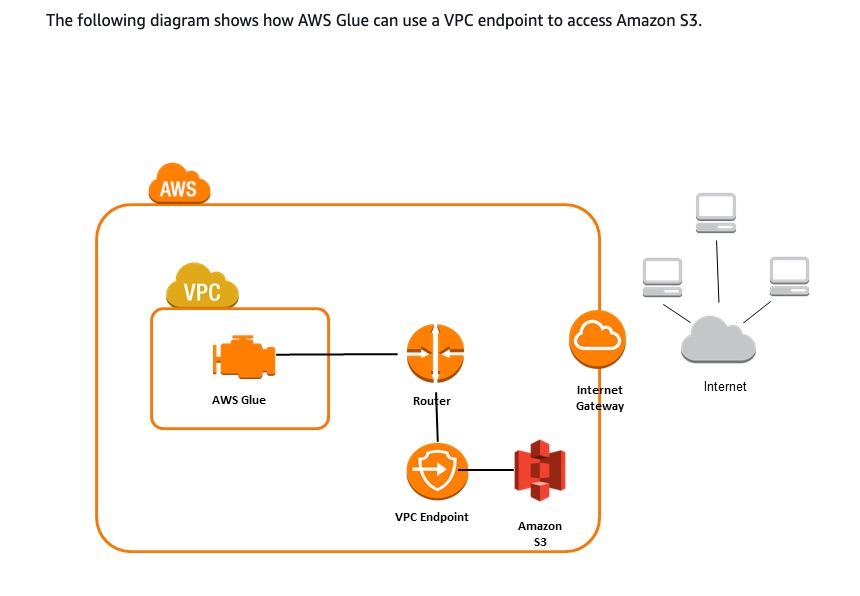
A VPC endpoint for Amazon S3 enables AWS Glue to use private IP addresses to access Amazon S3 with no exposure to the public internet. AWS Glue does not require public IP addresses, and you don't need an internet gateway, a NAT device, or a virtual private gateway in your VPC. You use endpoint policies to control access to Amazon S3. Traffic between your VPC and the AWS service does not leave the Amazon network.
AWS Glue with VPC endpoints:
Incorrect options:
Attach a bucket policy to the S3 bucket that will explicitly grant access permissions to the IAM role associated with the AWS Glue job - An Amazon S3 bucket policy that does not have sufficient permissions for the IAM role associated with the AWS Glue job will not result in an error pointing to the Amazon S3 VPC gateway endpoint. So, this option is ruled out.
Configure private DNS options for the VPC gateway endpoint - For private connectivity, you use private DNS options for your Amazon S3 when you use an interface VPC endpoint. This configuration does not apply to the gateway endpoint.
Configure an Internet Gateway in the VPC for the AWS Glue job to access the Amazon S3 bucket via the public endpoint - The correct solution is to set up a VPC endpoint for Amazon S3 that enables AWS Glue to use private IP addresses to access Amazon S3 with no exposure to the public internet.
References:
https://docs.aws.amazon.com/vpc/latest/userguide/route-table-options.html
https://docs.aws.amazon.com/vpc/latest/privatelink/vpc-endpoints-s3.htm
Discussion
Think the marked answer is wrong, or have a better explanation? Share it below — comments appear after review.

