
Uipath Certified RPA Associate Uirpa · Free Practice Question Easy
Question 17
Scenario: You are an RPA Developer and you would like to use a datatype which can store any kind of data, including text, numbers, dates, and arrays.
Which of the following is a data type particular to UiPath which can fulfill this request?
-
A
GenericValue
-
B
Data Table
-
C
Dictionary
-
D
Collection
Reveal correct answer
Correct answer: A
Explanation
GenericValue is a data type particular to UiPath and can store any kind of data, including text, numbers, dates, and arrays.
GenericValue Variables
The GenericValue variable is a type of variable that can store any kind of data, including text, numbers, dates, and arrays, and is particular to UiPath Studio.
GenericValue variables are automatically converted to other types, in order to perform certain actions. However, it is important to use these types of variables carefully, as their conversion may not always be the correct one for your project.
UiPath Studio has an automatic conversion mechanism of GenericValue variables, which you can guide towards the desired outcome by carefully defining their expressions. Take into account that the first element in your expression is used as a guideline for what operation Studio performs. For example, when you try to add two GenericValue variables, if the first one in the expression is defined as a String, the result is the concatenation of the two. If it is defined as an Integer, the result is their sum.
Supported .NET Methods
CompareTo
Function GenericValue.CompareTo(other As GenericValue) As Integer
Function GenericValue.CompareTo(obj As Object) As Integer
Contains
Function GenericValue.Contains(other As String) As Boolean
Used to check whether a string variable contains a certain substring or not. For example, if you want to check if a sentence contains a specific word, the expression should be [SentenceVariable].Contains("term"), where [SentenceVariable] is the GenericValue variable containing the sentence and "term" is the word to be searched for.
Note: When using this method with a GenericValue variable of data type Int, Float or Boolean, the data is automatically converted to String and handled accordingly.
Equals
Function GenericValue.Equals(other As GenericValue) As Boolean
Function GenericValue.Equals(obj As Object) As Boolean
GetHashCode
Function GenericValue.GetHashCode() As Integer
GetType
Function Object.GetType() As Type
GetTypeCode
Function GenericValue.GetTypeCode() As TypeCode
IndexOf
Function GenericValue.IndexOf(value As String) As Integer
Function GenericValue.IndexOf(value As String, comparisonType As StringComparison) As Integer
Function GenericValue.IndexOf(value As String, startIndex As Integer) As Integer
Function GenericValue.IndexOf(value As String, startIndex As Integer, comparisonType As StringComparison) As Integer
Used to return the index of a substring contained inside a string variable. For example, if you want to find the index of the word "locate" inside the sentence "Find 'locate' in this sentence", the expression should be [SentenceVariable].IndexOf("locate"), where [SentenceVariable] is the GenericValue variable containing the sentence and "locate" is the term to be searched for.
Note: When using this method with a GenericValue variable of data type Int, Float or Boolean, the data is automatically converted to String and handled accordingly.
Length
Function GenericValue.Lenght() As Integer
Used to return the number of characters in a string variable. For example, if you want to find out how many letters a word has, the expression should be [WordVariable].Length, where [WordVariable] is the GenericValue variable containing the word.
Note: When using this method with a GenericValue variable of data type Int, Float or Boolean, the data is automatically converted to String and handled accordingly.
Replace
Function GenericValue.Replace(oldValue As String, new value As String) As String
Used to replace data contained inside a string variable. For example, if you want to change a local file path C:\ExampleFolder\Main.xaml into the corresponding server file path C:/ExampleFolder/Main.xaml, the expression should be [PathVariable].Replace("\","/") where [PathVariable] is the GenericValue variable containing the file path, "\" is the character to be replaced and "/" is the character used as replacement.
Note: When using this method with a GenericValue variable of data type Int, Float or Boolean, the data is automatically converted to String and handled accordingly.
Split
Function GenericValue.Split(ParamArray separator As Char()) As String()
Function GenericValue.Split(ParamArray separator As String()) As String()
Function GenericValue.Split(separator As Char(), options As StringSplitOptions) As String()
Function GenericValue.Split(separator As String(), options As StringSplitOptions) As String()
Used to return individual components from a string variable. For example, if you want to extract the year from a MM.DD.YYYY date format, the expression should be [DateVariable].Split(".".ToCharArray)(2), where [DateVariable] is the GenericValue variable containing the date, "." is the character used as a separator, .ToCharArray is a method that creates an array with the elements delimited by the separator and (2) represents the index of the element to be returned, in our case, the year.
Note: When using this method with a GenericValue variable of data type Int, Float or Boolean, the data is automatically converted to String and handled accordingly.
Substring
Function GenericValue.Substring(startIndex As Integer) As String
Function GenericValue.Substring(startIndex As Integer, length As Integer) As String
Used to return a substring contained in a string variable. For example, if you want to extract a word from the "There are 100 machines available" sentence, the expression should be [SentenceVariable].Substring(10,3), where [SentenceVariable] is the GenericValue variable containing the sentence, 10 is the index of the first character to be returned, and 3 is the length of the substring starting from the first character. In this example, the resulted substring would be "100".
Note: When using this method with a GenericValue variable of data type Int, Float or Boolean, the data is automatically converted to String and handled accordingly.
ToBoolean
Function GenericValue.ToBoolean(provider As IFormatProvider) As Boolean
ToByte
Function GenericValue.ToByte(provider As IFormatProvider) As Byte
ToChar
Function GenericValue.ToChar(provider As IFormatProvider) As Char
ToDecimal
Function GenericValue.ToDecimal(provider As IFormatProvider) As Decimal
Function GenericValue.ToDecimal(format As NumberStyles) As Decimal
ToDouble
Function GenericValue.ToDouble(provider As IFormatProvider) As Double
Function GenericValue.ToDouble(format As NumberStyles) As Double
ToInt
Function GenericValue.ToInt(culture As IFormatProvider) As Integer?
Function GenericValue.ToInt() As Integer?
Used to convert a specified value to a nullable integer.
Note: When using this method with a GenericValue variable of data type Boolean, the "True" and "False" values are converted to 1 and 0, respectively.
ToInt16
Function GenericValue.ToInt16(provider As IFormatProvider) As Short
Note: When using this method with a GenericValue variable of data type Boolean, the "True" and "False" values are converted to 1 and 0, respectively.
ToInt32
Function GenericValue.ToInt32(provider As IFormatProvider) As Integer
Note: When using this method with a GenericValue variable of data type Boolean, the "True" and "False" values are converted to 1 and 0, respectively.
ToInt64
Function GenericValue.ToInt64(provider As IFormatProvider) As Long
Note: When using this method with a GenericValue variable of data type Boolean, the "True" and "False" values are converted to 1 and 0, respectively.
ToLower
Function GenericValue.ToLower() As String
Note: When using this method with a GenericValue variable of data type Int, Float or Boolean, the data is automatically converted to String and handled accordingly.
ToLowerInvariant
Function GenericValue.ToLowerInvariant() As String
Note: When using this method with a GenericValue variable of data type Int, Float or Boolean, the data is automatically converted to String and handled accordingly.
ToSByte
Function GenericValue.ToSByte(provider As IFormatProvider) As SByte
ToSingle
Function GenericValue.ToSingle(provider As IFormatProvider) As Single
ToString
Function GenericValue.ToString(formatProvider As IFormatProvider) As String
Function GenericValue.ToString(format As String, formatProvider As IFormatProvider) As String
Function GenericValue.ToString() As String
ToType
Function GenericValue.ToType(conversionType As Type, provider As IFormatProvider) As Object
ToUInt16
Function GenericValue.ToUInt16(provider As IFormatProvider) As UShort
Note: When using this method with a GenericValue variable of data type Boolean, the "True" and "False" values are converted to 1 and 0, respectively.
ToUInt32
Function GenericValue.ToUInt32(provider As IFormatProvider) As UInteger
Note: When using this method with a GenericValue variable of data type Boolean, the "True" and "False" values are converted to 1 and 0, respectively.
ToUInt64
Function GenericValue.ToUInt64(provider As IFormatProvider) As Ulong
Note: When using this method with a GenericValue variable of data type Boolean, the "True" and "False" values are converted to 1 and 0, respectively.
ToUpper
Function GenericValue.ToUpper() As String
Note: When using this method with a GenericValue variable of data type Int, Float or Boolean, the data is automatically converted to String and handled accordingly.
ToUpperInvariant
Function GenericValue.ToUpperInvariant() As String
Note: When using this method with a GenericValue variable of data type Int, Float or Boolean, the data is automatically converted to String and handled accordingly.
Trim
Function GenericValue.Trim(ParamArray trimChars As Char()) As String
Function GenericValue.Trim() As String
Note: When using this method with a GenericValue variable of data type Int, Float or Boolean, the data is automatically converted to String and handled accordingly.
TrimEnd
Function GenericValue.TrimEnd(ParamArray trimChars As Char()) As String
Note: When using this method with a GenericValue variable of data type Int, Float or Boolean, the data is automatically converted to String and handled accordingly.
TrimStart
Function GenericValue.TrimStart(ParamArray trimChars As Char()) As String
Note: When using this method with a GenericValue variable of data type Int, Float or Boolean, the data is automatically converted to String and handled accordingly.
When using Ctrl + K, Ctrl + M, or Ctrl + Shift + M directly in the Format Value activity body, the created variable or argument is of type GenericValue. For other activities, the created type is the same as the required type of the activity.
Example of Using a GenericValue Variable
To demonstrate how a GenericValue variable works, let us create an automation that performs different operations whose results depend on the way we define their expressions. We create two GenericValue variables of different data types and display the results in the Output panel.
Create a new blank project.
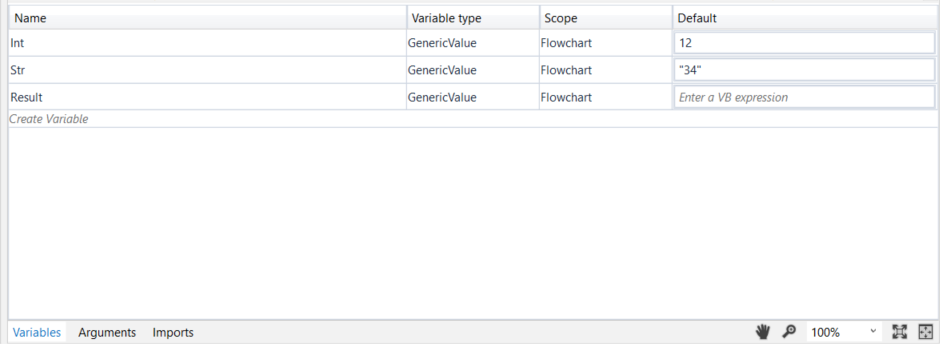
Create three GenericValue variables:
Int,Str, andResult.In the Default column for the
Intvariable, type 12, and for theStrvariable, type "34". The first variable is interpreted as an integer, while the second one is interpreted as a string.
Add an Assign activity to the Designer panel and connect it to the Start node.
In the Properties panel, in the To field, enter the
Resultvariable.In the Value field, type
Int+Str.Add a Write Line activity and connect it to the Assign one.
Double click the activity card and in the Text field, enter the
Resultvariable.
The project should look as in the following screenshot.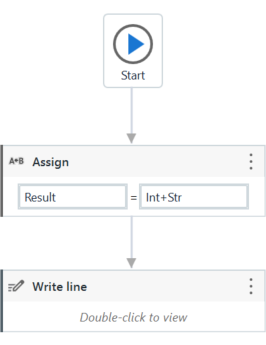
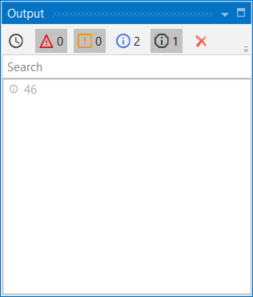
Press F5 to execute your automation. Note that, in the Output panel, the sum of the two numbers is displayed.
Go back to the previously added Assign activity and change the Value field to
Str+Int, to reverse the order of the variables. The project should look as in the following screenshot.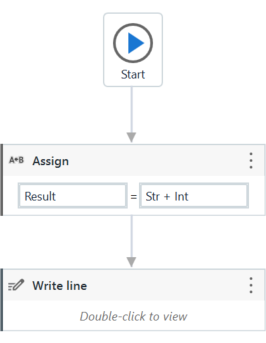
Press F5 to execute your automation. Note that, in the Output panel, the concatenation of the two numbers is displayed.
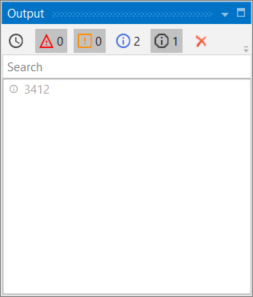
This means that UiPath Studio takes the first element defined in your expression as a guideline for what operation to perform. If the first element in your expression is an integer or a GenericValue variable filled in as integer, UiPath Studio will perform the sum of the elements.
If the first element in your expression is a string or a GenericValue variable filled in as string, UiPath Studio will perform the concatenation of the elements.
Discussion
Think the marked answer is wrong, or have a better explanation? Share it below — comments appear after review.

