
Uipath Certified RPA Associate Uirpa · Free Practice Question Medium
Question 9
Scenario: You are working on an RPA project and need to populate a list of strings, type variable, with the values BTC, ETH, USDT, and XRP.
Which of the following methods can be used to populate the target list?
-
A
Set the Default value in the Variables panel to {"BTC", "ETH", "USDT", "XRP"}
-
B
Leave the Default value blank and use Add To Collection activities to populate the list.
-
C
Initiate the variable with New List(of String) and use Add To Collection activities to populate the list.
-
D
Set the Default value in the Variables panel to New List(of String) from {"BTC", "ETH", "USDT", "XRP"}
Reveal correct answers
Correct answers: C, D
Explanation
The following methods can be used to populate the target list:
Initiate the variable with New List(of String) and use Add To Collection activities to populate the list.
Set the Default value in the Variables panel to New List(of String) from {"BTC", "ETH", "USDT", "XRP"}
Manipulating lists can be done using .NET methods or using the collection methods that UiPath Studio offers:
Add to Collection
Adds an item to a specified collection. It is equivalent to List.Add(). It can be used, for example, to add a new name to a list of company names.
https://forum.uipath.com/t/how-add-lists/137184
Remove from Collection
Removes an item from a specified collection and can output a Boolean variable that confirms the success of the removal operation. This activity can be used, for example, to remove an invoice number from a list of invoices to be processed.
https://forum.uipath.com/t/remove-all-from-collection/20094
Exists in Collection
Indicates whether a given item is present in a given collection by outputting a Boolean as the result. We can use this activity to check whether a list of clients contains a specific name.
https://forum.uipath.com/t/exists-in-collection-activity/150366
Clear Collection
Clears a specified collection of all items. One possible use is to empty a collection before starting a new phase of a process that will populate it again.
https://forum.uipath.com/t/how-to-use-clear-collection-on-an-array/142372
The Variables Panel
The Variables panel enables you to create variables and make changes to them. Renaming a variable in this panel automatically updates all occurrences in the current file.


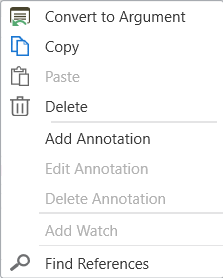
The Context Menu for Variables

Discussion
Think the marked answer is wrong, or have a better explanation? Share it below — comments appear after review.

