
AWS Certified Machine Learning Engineer Associate · Free Practice Question Medium
Question 24
You are an ML engineer working for a logistics company that uses machine learning models to optimize delivery routes, predict maintenance needs, and forecast demand. The company wants to deploy several models into production, each serving different business functions but running on the same infrastructure to minimize costs. These models differ in the frequency of updates. The company is considering whether to use a multi-model deployment approach or a multi-container deployment approach on Amazon SageMaker to manage these models efficiently.
Given these requirements, which deployment strategy is MOST SUITABLE for managing these diverse models?
-
A
Use a multi-model deployment on a single SageMaker endpoint to host all models together, allowing you to dynamically load and serve models as needed without needing separate endpoints
-
B
Use a hybrid approach where frequently updated models are deployed using multi-model endpoints and more complex models are deployed using multi-container endpoints, balancing flexibility and resource management
-
C
Implement a multi-container deployment strategy on a single SageMaker endpoint, where each model runs in its own container, allowing you to manage resource allocation more precisely across models
-
D
Deploy each model individually using separate SageMaker endpoints, ensuring each model has dedicated resources and can be scaled independently
Reveal correct answer
Correct answer: A
Explanation
Correct option:
Use a multi-model deployment on a single SageMaker endpoint to host all models together, allowing you to dynamically load and serve models as needed without needing separate endpoints
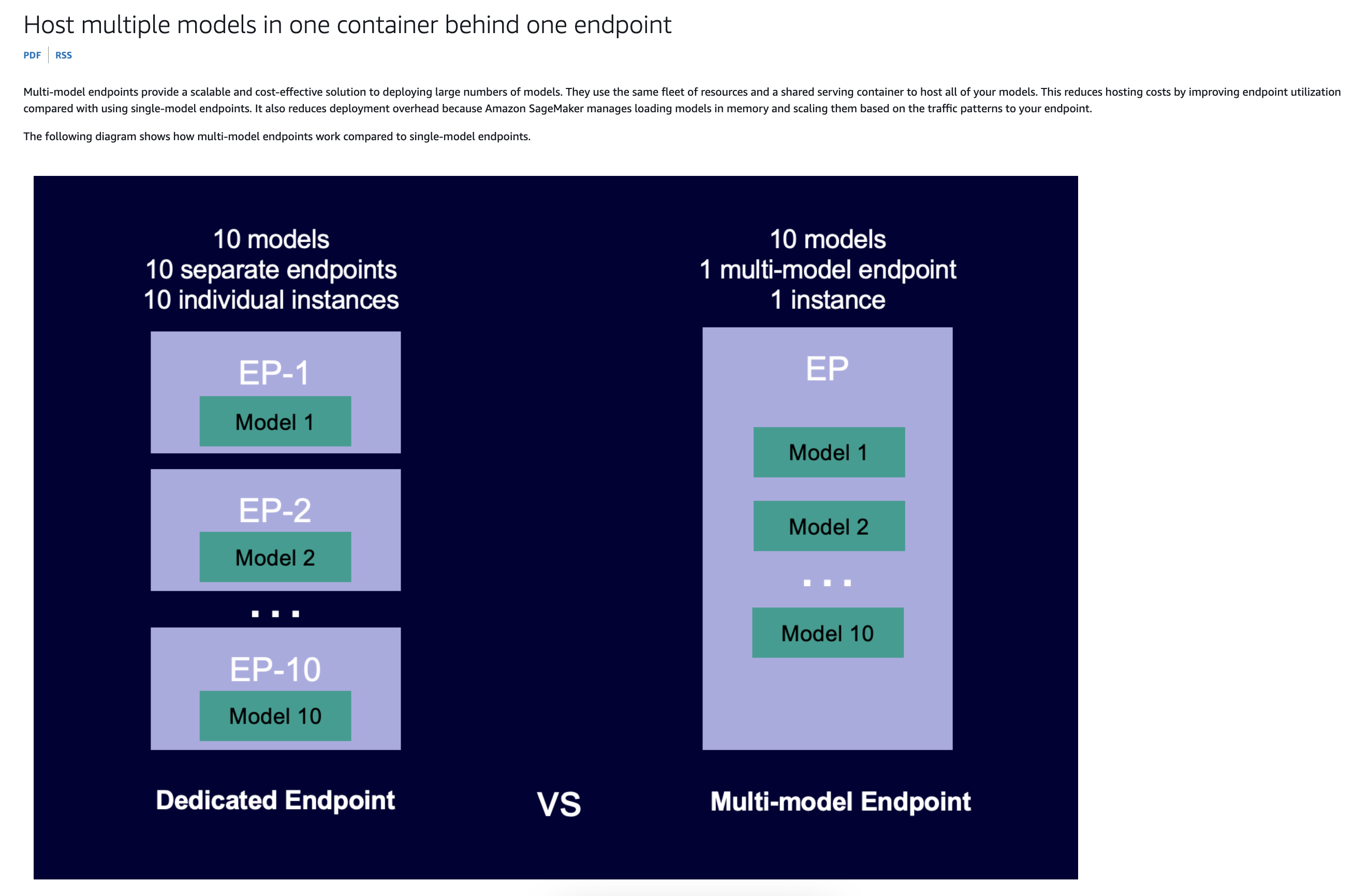
Multi-model endpoints are ideal for hosting a large number of models that use the same ML framework on a shared serving container. If you have a mix of frequently and infrequently accessed models, a multi-model endpoint can efficiently serve this traffic with fewer resources and higher cost savings. Your application should be tolerant of occasional cold start-related latency penalties that occur when invoking infrequently used models.
Multi-model endpoints support hosting both CPU and GPU backed models. By using GPU backed models, you can lower your model deployment costs through increased usage of the endpoint and its underlying accelerated compute instances.
Multi-model endpoints also enable time-sharing of memory resources across your models. This works best when the models are fairly similar in size and invocation latency. When this is the case, multi-model endpoints can effectively use instances across all models. If you have models that have significantly higher transactions per second (TPS) or latency requirements, we recommend hosting them on dedicated endpoints.
Incorrect options:
Deploy each model individually using separate SageMaker endpoints, ensuring each model has dedicated resources and can be scaled independently - Deploying each model on a separate endpoint provides dedicated resources and independent scaling but can lead to higher costs and complexity, especially when managing many models.
Implement a multi-container deployment strategy on a single SageMaker endpoint, where each model runs in its own container, allowing you to manage resource allocation more precisely across models - A multi-container deployment is useful when models have different dependencies or require isolation for security reasons. However, it is more complex to manage than multi-model deployment and may be overkill if your models do not require strict separation or have different runtime environments.
Use a hybrid approach where frequently updated models are deployed using multi-model endpoints and more complex models are deployed using multi-container endpoints, balancing flexibility and resource management - While a hybrid approach might seem to provide flexibility, it adds complexity in terms of management and deployment. It’s better to choose a single approach that meets most of your needs unless there are specific reasons to segregate models by deployment type.
References:
https://docs.aws.amazon.com/sagemaker/latest/dg/multi-model-endpoints.html
https://docs.aws.amazon.com/sagemaker/latest/dg/multi-container-direct.html
Discussion
Think the marked answer is wrong, or have a better explanation? Share it below — comments appear after review.

