
AWS Certified Data Engineer Associate · Free Practice Question Medium
Question 51
A healthcare company collects user health information on a daily basis and stores this data on Amazon S3 which is then queried by Amazon Athena for analysis. Any user health information older than a week is never used in the queries. The data engineering team at the company has now set up a Glue crawler to automate the process but the crawler has been running for several hours and is still unable to identify the schema of the data store.
Which of the following options can be used to fix this issue?
-
A
Compressed files, like Apache Parquet, take longer to crawl. Instead, use uncompressed files
-
B
Change the
Scanning rateparameter of Glue Crawler to a higher value for the Crawler to complete the scan faster -
C
Split larger files into smaller ones, to reduce the overhead of reading large files for the Glue Crawler
-
D
Use an exclude pattern for the Glue crawler to filter out the unwanted files
Reveal correct answer
Correct answer: D
Explanation
Correct option:
Use an exclude pattern for the Glue crawler to filter out the unwanted files
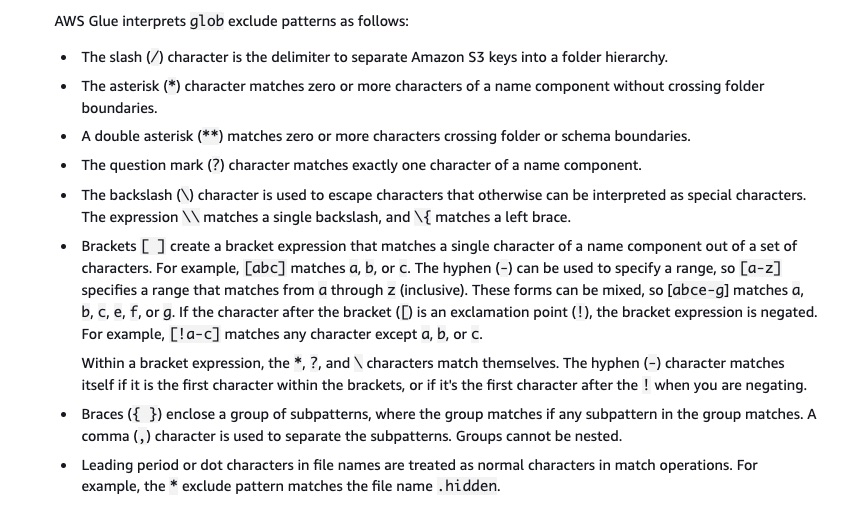
An exclude pattern tells the crawler to skip certain files or paths. Exclude patterns reduce the number of files that the crawler must list, making the crawler run faster. For example, use an exclude pattern to exclude metafiles and files that have already been crawled.
More on crawler exclude patterns:
Incorrect options:
Compressed files, like Apache Parquet, take longer to crawl. Instead, use uncompressed files - Compressed files take longer to crawl. That's because the crawler must download the file and decompress it before reading the first megabyte or listing the file. For Apache Parquet, Apache Avro, and Apache Orc files, the crawler doesn't crawl the first megabyte. Instead, the crawler reads the metadata stored in each file. So this option is not relevant for the given use case.
Change the Scanning rate parameter of Glue Crawler to a higher value for the Crawler to complete the scan faster - Scanning rate specifies the percentage of the configured read capacity units to use by the AWS Glue crawler. This parameter is available only for DynamoDB data stores.
Split larger files into smaller ones, to reduce the overhead of reading large files for the Glue Crawler - This statement is incorrect. It takes more time to crawl a large number of small files than a small number of large files. That's because the crawler must list each file and must read the first megabyte of each new file.
References:
https://aws.amazon.com/premiumsupport/knowledge-center/long-running-glue-crawler/
https://docs.aws.amazon.com/glue/latest/dg/define-crawler.html
Discussion
Think the marked answer is wrong, or have a better explanation? Share it below — comments appear after review.

