
AWS Certified Developer Associate · Free Practice Question Medium
Question 15
The customer feedback functionality for a company's flagship web application is handled via an Amazon API Gateway based REST API that invokes an AWS Lambda function for further processing. Although the performance of the function is satisfactory, the development team has been tasked to optimize the startup time of the Lambda function to further improve the customer experience.
How will you optimize the Lambda function for faster initialization?
-
A
Configure provisioned concurrency for the Lambda function to respond immediately to the function's invocations
-
B
Enable API caching in Amazon API Gateway to cache AWS Lambda function response
-
C
Configure an interface VPC endpoint powered by AWS PrivateLink to access the Amazon API Gateway REST API with milliseconds latency
-
D
Configure reserved concurrency to guarantee the maximum number of concurrent instances of the Lambda function
Reveal correct answer
Correct answer: A
Explanation
Correct option:
Configure provisioned concurrency for the Lambda function to respond immediately to the function's invocations
When Lambda allocates an instance of your function, the runtime loads your function's code and runs the initialization code that you define outside of the handler. If your code and dependencies are large, or you create SDK clients during initialization, this process can take some time. When your function has not been used for some time, needs to scale up, or when you update a function, Lambda creates new execution environments. This causes the portion of requests that are served by new instances to have higher latency than the rest, otherwise known as a cold start.
By allocating provisioned concurrency before an increase in invocations, you can ensure that all requests are served by initialized instances with low latency. Lambda functions configured with provisioned concurrency run with consistent start-up latency, making them ideal for building interactive mobile or web backends, latency-sensitive microservices, and synchronously invoked APIs.
Functions with Provisioned Concurrency differ from on-demand functions in some important ways:
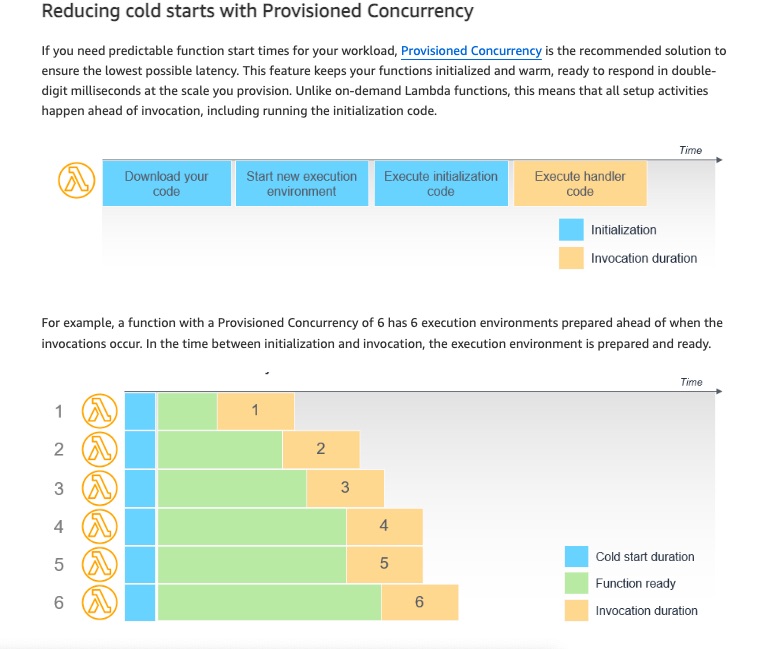
Initialization code does not need to be optimized. Since this happens long before the invocation, lengthy initialization does not impact the latency of invocations. If you are using runtimes that typically take longer to initialize, like Java, the performance of these can benefit from using Provisioned Concurrency.
Initialization code is run more frequently than the total number of invocations. Since Lambda is highly available, for every one unit of Provisioned Concurrency, there are a minimum of two execution environments prepared in separate Availability Zones. This is to ensure that your code is available in the event of a service disruption. As environments are reaped and load balancing occurs, Lambda over-provisions environments to ensure availability. You are not charged for this activity. If your code initializer implements logging, you will see additional log files anytime that this code is run, even though the main handler is not invoked.
Provisioned Concurrency cannot be used with the $LATEST version. This feature can only be used with published versions and aliases of a function. If you see cold starts for functions configured to use Provisioned Concurrency, you may be invoking the $LATEST version, instead of the version or alias with Provisioned Concurrency configured.
Reducing cold starts with Provisioned Concurrency:
Incorrect options:
Configure reserved concurrency to guarantee the maximum number of concurrent instances of the Lambda function - Reserved concurrency guarantees the maximum number of concurrent instances for the function. When a function has reserved concurrency, no other function can use that concurrency. There is no charge for configuring reserved concurrency for a function. Whereas, provisioned concurrency initializes a requested number of execution environments so that they are prepared to respond immediately to your function's invocations.
Configure an interface VPC endpoint powered by AWS PrivateLink to access the Amazon API Gateway REST API with milliseconds latency - An interface VPC endpoint can be used to connect your VPC resources to the AWS Lambda function without crossing the public internet. VPC endpoint is irrelevant to the current discussion.
Enable API caching in Amazon API Gateway to cache AWS Lambda function response - With caching, you can reduce the number of calls made to your AWS Lambda function and also improve the latency of requests to your API. Caching is best-effort and applications making frequent API calls to retrieve static data can benefit from a caching layer. Caching does not reduce the initialization time Lambda takes and hence is not an optimal solution for this use case.
References:
https://docs.aws.amazon.com/lambda/latest/dg/provisioned-concurrency.html
https://aws.amazon.com/blogs/compute/operating-lambda-performance-optimization-part-1/
https://docs.aws.amazon.com/apigateway/latest/developerguide/api-gateway-caching.html
Discussion
Think the marked answer is wrong, or have a better explanation? Share it below — comments appear after review.

