
AWS Certified Devops Engineer Professional · Free Practice Question Hard
Question 19
Consider a multi-account setup within AWS Organizations where a company is running a data ingestion application on Amazon EC2 instances through several Auto Scaling groups. These instances lack internet access due to sensitive data handling, and VPC endpoints have been deployed accordingly. The application operates on a custom AMI designed specifically for its needs.
To effectively manage and troubleshoot the application, system administrators require automated and centralized login access to the EC2 instances. Additionally, the company's security team needs to be notified whenever such instances are accessed.
As an AWS Certified DevOps Engineer - Professional, what solution will you suggest to satisfy these requirements?
-
A
Utilize AWS Systems Manager Automation to rebuild the custom AMI that includes the latest AWS Systems Manager Agent version. Configure AWS Config to attach an SCP to the root organization account to allow the EC2 instances to connect to Systems Manager and grant access to centralized and automated login. Configure logging of session details to Amazon S3. Set up an S3 event notification for new file uploads to notify the security team via an Amazon Simple Notification Service (Amazon SNS) topic
-
B
Utilize EC2 Image Builder to rebuild the custom AMI that includes the latest AWS Systems Manager Agent version. Set up the Auto Scaling group to attach the AmazonSSMManagedInstanceCore role to EC2 instances. Leverage EC2 Instance Connect for centralized access and automated login. Configure logging of session details to Amazon S3. Set up an S3 event notification for new file uploads to notify the security team via an Amazon Simple Notification Service (Amazon SNS) topic
-
C
Set up a NAT gateway and a bastion host with internet access. Configure a security group that permits incoming traffic from the bastion host to all EC2 instances. Set up AWS Systems Manager Agent on the EC2 instances for monitoring and troubleshooting. Leverage Auto Scaling group lifecycle hooks for monitoring access. Utilize Systems Manager Session Manager for centralized login. Direct EC2 instance logs to an Amazon CloudWatch Logs log group. For auditing purposes, export data to Amazon S3 and notify the security team through S3 event notifications
-
D
Utilize EC2 Image Builder to rebuild the custom AMI that includes the latest AWS Systems Manager Agent version. Set up the Auto Scaling group to attach the AmazonSSMManagedInstanceCore role to EC2 instances. Leverage Systems Manager Session Manager for centralized and automated login. Configure logging of session details to Amazon S3. Set up an S3 event notification for new file uploads to notify the security team via an Amazon Simple Notification Service (Amazon SNS) topic
Reveal correct answer
Correct answer: D
Explanation
Correct option:
Utilize EC2 Image Builder to rebuild the custom AMI that includes the latest AWS Systems Manager Agent version. Set up the Auto Scaling group to attach the AmazonSSMManagedInstanceCore role to EC2 instances. Leverage Systems Manager Session Manager for centralized and automated login. Configure logging of session details to Amazon S3. Set up an S3 event notification for new file uploads to notify the security team via an Amazon Simple Notification Service (Amazon SNS) topic
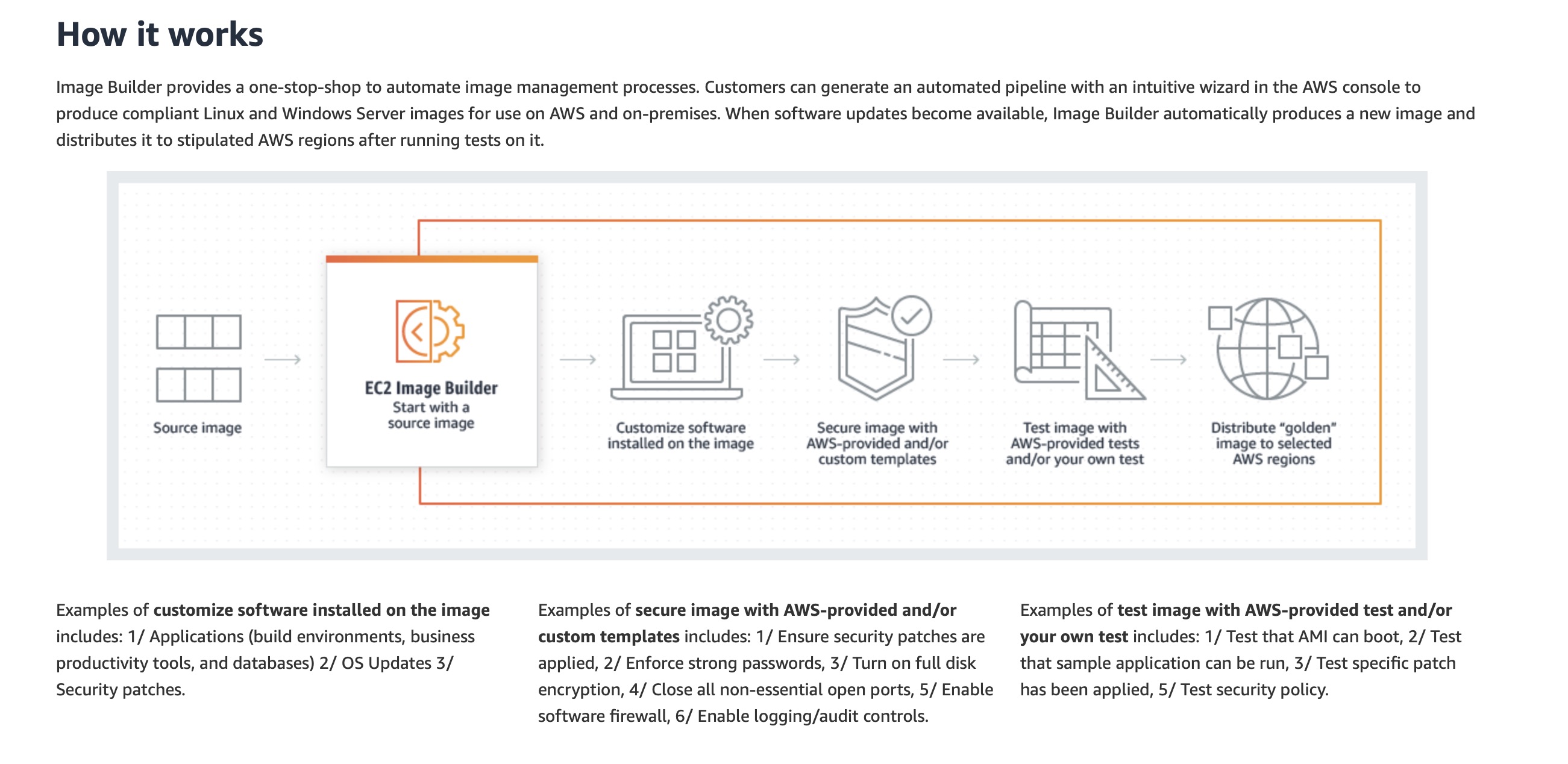
This option suggests using EC2 Image Builder to create an updated custom AMI with AWS Systems Manager Agent included. The Auto Scaling group is configured to attach the AmazonSSMManagedInstanceCore role to the instances, thereby enabling centralized management through Systems Manager, as it grants the EC2 instances the permissions needed for core Systems Manager functionality. Session Manager can be used for secure logins, and session details can be logged to Amazon S3. Additionally, an S3 event notification can be set up to alert the security team about new file uploads using Amazon SNS. This option aligns well with the requirement for centralized access and monitoring.
Incorrect options:
Set up a NAT gateway and a bastion host with internet access. Configure a security group that permits incoming traffic from the bastion host to all EC2 instances. Set up AWS Systems Manager Agent on the EC2 instances for monitoring and troubleshooting. Leverage Auto Scaling group lifecycle hooks for monitoring access. Utilize Systems Manager Session Manager for centralized login. Direct EC2 instance logs to an Amazon CloudWatch Logs log group. For auditing purposes, export data to Amazon S3 and notify the security team through S3 event notifications - This option includes unnecessary internet access for sensitive data via the combination of NAT Gateway and bastion host, so it is not the best fit for the given use case.
Utilize EC2 Image Builder to rebuild the custom AMI that includes the latest AWS Systems Manager Agent version. Set up the Auto Scaling group to attach the AmazonSSMManagedInstanceCore role to EC2 instances. Leverage EC2 Instance Connect for centralized access and automated login. Configure logging of session details to Amazon S3. Set up an S3 event notification for new file uploads to notify the security team via an Amazon Simple Notification Service (Amazon SNS) topic - EC2 Instance Connect is a way to distribute short-lived SSH keys and control access by IAM policies. The actual connection is created with SSH client and all normal requirements (network connectivity, user on host etc) apply. The host must also have ec2-instance-connect “agent” installed. EC2 Instance Connect still requires public IP and network connectivity, so it is not the best fit for the given use case.
Utilize AWS Systems Manager Automation to rebuild the custom AMI that includes the latest AWS Systems Manager Agent version. Configure AWS Config to attach an SCP to the root organization account to allow the EC2 instances to connect to Systems Manager and grant access to centralized and automated login. Configure logging of session details to Amazon S3. Set up an S3 event notification for new file uploads to notify the security team via an Amazon Simple Notification Service (Amazon SNS) topic - SCPs are similar to AWS Identity and Access Management (IAM) permission policies and use almost the same syntax. However, an SCP never grants permissions. Instead, SCPs are JSON policies that specify the maximum permissions for the affected accounts. So, for the given use case, you cannot use SCP for granting EC2 instance access to centralized and automated login for the Systems Manager.
References:
https://aws.amazon.com/image-builder/
https://docs.aws.amazon.com/systems-manager/latest/userguide/ssm-agent.html
https://docs.aws.amazon.com/systems-manager/latest/userguide/session-manager.html
https://docs.aws.amazon.com/AWSEC2/latest/UserGuide/Connect-using-EC2-Instance-Connect.html
https://docs.aws.amazon.com/organizations/latest/userguide/orgs_manage_policies_scps.html
Discussion
Think the marked answer is wrong, or have a better explanation? Share it below — comments appear after review.

