
AWS Certified Solutions Architect Professional · Free Practice Question Medium
Question 20
A mobile app with video upload and archival capabilities has been launched a few weeks ago with Amazon S3 as the storage service supporting videos of up to 10 GB each. The S3 bucket is configured for Virginia (us-east-1) Region. The application is gaining a lot of traction in Melbourne and Sydney cities of Australia. The users of these cities have been complaining of slow uploads and regular timeouts while using the application.
Which of the following options can be used to speed up the uploads and enhance the user experience?
-
A
To upload video files to Amazon S3 bucket, leverage multipart uploads feature. Configure CloudFront distribution with Amazon S3 bucket as the origin to minimize latency and enhance user experience
-
B
To upload video files to Amazon S3 bucket, leverage multipart uploads feature. Configure the application to use S3 Transfer Acceleration endpoints to improve the performance of uploads and also optimize the multipart uploads
-
C
Extend your AWS infrastructure by configuring AWS outposts on the edge locations of AWS regions with a good user base. Data of the Amazon S3 buckets are stored on the outposts to provide low latency (both upload and download)access to the user
-
D
Configure an Amazon S3 bucket in every AWS Region that has a good user base. Use S3 replication to sync all the S3 buckets and serve the videos with minimum latency
Reveal correct answer
Correct answer: B
Explanation
Correct option:
To upload video files to an Amazon S3 bucket, leverage the multipart uploads feature. Configure the application to use S3 Transfer Acceleration endpoints to improve the performance of uploads and also optimize the multipart uploads
When you upload large files to Amazon S3, it's a best practice to leverage multipart uploads. If you're using the AWS Command Line Interface (AWS CLI), then all high-level AWS s3 commands automatically perform a multipart upload when the object is large. These high-level commands include aws s3 cp and aws s3 sync.
Consider the following options for improving the performance of uploads and optimizing multipart uploads: 1. If you're using the AWS CLI, customize the upload configurations. 2. Enable Amazon S3 Transfer Acceleration.
Using CLI to customize the upload configurations:
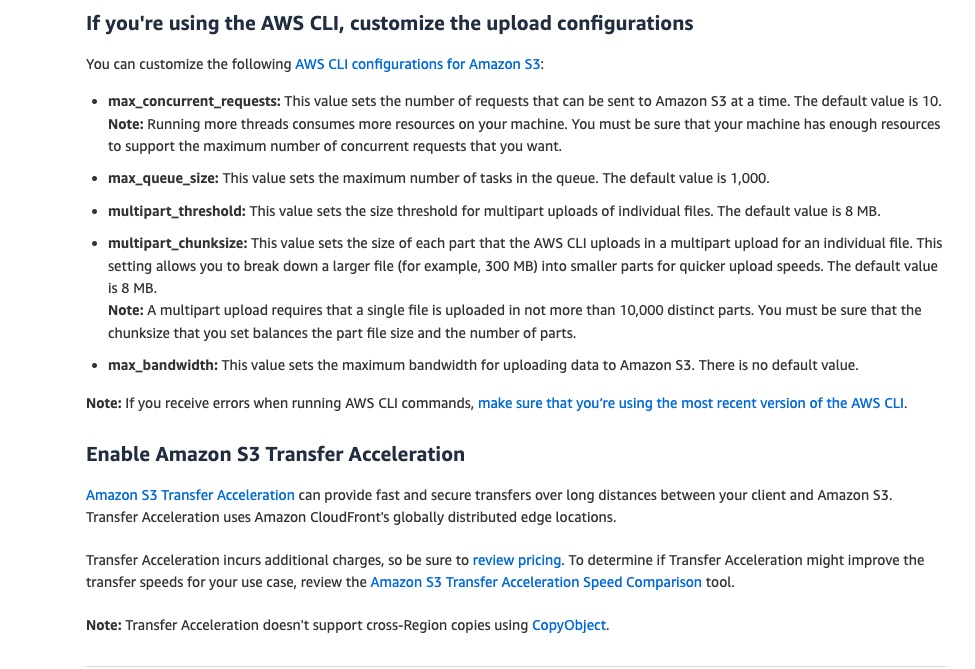
Amazon S3 Transfer Acceleration can speed up content transfers to and from Amazon S3 by as much as 50%-500% for long-distance transfer of larger objects. Customers who have either web or mobile applications with widespread users or applications hosted far away from their S3 bucket can experience long and variable upload and download speeds over the Internet. S3 Transfer Acceleration (S3TA) reduces the variability in Internet routing, congestion, and speeds that can affect transfers, and logically shortens the distance to S3 for remote applications. S3TA improves transfer performance by routing traffic through Amazon CloudFront’s globally distributed Edge Locations and over AWS backbone networks, and by using network protocol optimizations. You can turn on S3TA with a few clicks in the S3 console, and test its benefits from your location with a speed comparison tool. With S3TA, you pay only for transfers that are accelerated.
Amazon S3 Transfer Acceleration Speed Comparison can be checked from http://s3-accelerate-speedtest.s3-accelerate.amazonaws.com/en/accelerate-speed-comparsion.html
Incorrect options:
To upload video files to an Amazon S3 bucket, leverage the multipart uploads feature. Configure CloudFront distribution with Amazon S3 bucket as the origin to minimize latency and enhance user experience - Amazon S3 Transfer Acceleration can enhance the performance of multipart uploads to the Amazon S3 bucket. AWS recommends it as a best practice too. CloudFront is much more relevant for cases where videos are shared online, this use case is for performance enhancement for video uploads and hence this option is not an optimal solution.
Configure an Amazon S3 bucket in every AWS Region that has a good user base. Use S3 replication to sync all the S3 buckets and serve the videos with minimum latency - Amazon S3 Replication enables automatic, asynchronous copying of objects across Amazon S3 buckets. For the given use case, we need a solution that can improve the video upload capabilities, rather than serving the video with minimum latency.
Extend your AWS infrastructure by configuring AWS outposts on the edge locations of AWS regions with a good user base. Data of the Amazon S3 buckets are stored on the outposts to provide low latency (both upload and download) access to the user - AWS Outposts is a family of fully managed solutions delivering AWS infrastructure and services to virtually any on-premises or edge location for a truly consistent hybrid experience. Outposts solutions allow you to extend and run native AWS services on-premises and are available in a variety of form factors. The given use case has no on-premises servers hence using AWS outposts is irrelevant to this solution.
References:
https://docs.aws.amazon.com/AmazonS3/latest/userguide/transfer-acceleration-examples.html
https://aws.amazon.com/premiumsupport/knowledge-center/s3-upload-large-files/
Discussion
Think the marked answer is wrong, or have a better explanation? Share it below — comments appear after review.

