
AWS Certified Sysops Administrator Associate · Free Practice Question Medium
Question 36
An e-commerce company manages its IT infrastructure on AWS Cloud via Elastic Beanstalk. The development team at the company is planning to deploy the next version with MINIMUM application downtime and the ability to rollback quickly in case the deployment goes wrong.
As a SysOps Administrator, which of the following options would you recommend to address the given use-case?
-
A
Deploy the new application version using 'Rolling' deployment policy
-
B
Deploy the new version to a separate environment via Blue/Green Deployment, and then swap Route 53 records of the two environments to redirect traffic to the new version
-
C
Deploy the new application version using 'All at once' deployment policy
-
D
Deploy the new application version using 'Rolling with additional batch' deployment policy
Reveal correct answer
Correct answer: B
Explanation
Correct option:
Deploy the new version to a separate environment via Blue/Green Deployment, and then swap Route 53 records of the two environments to redirect traffic to the new version
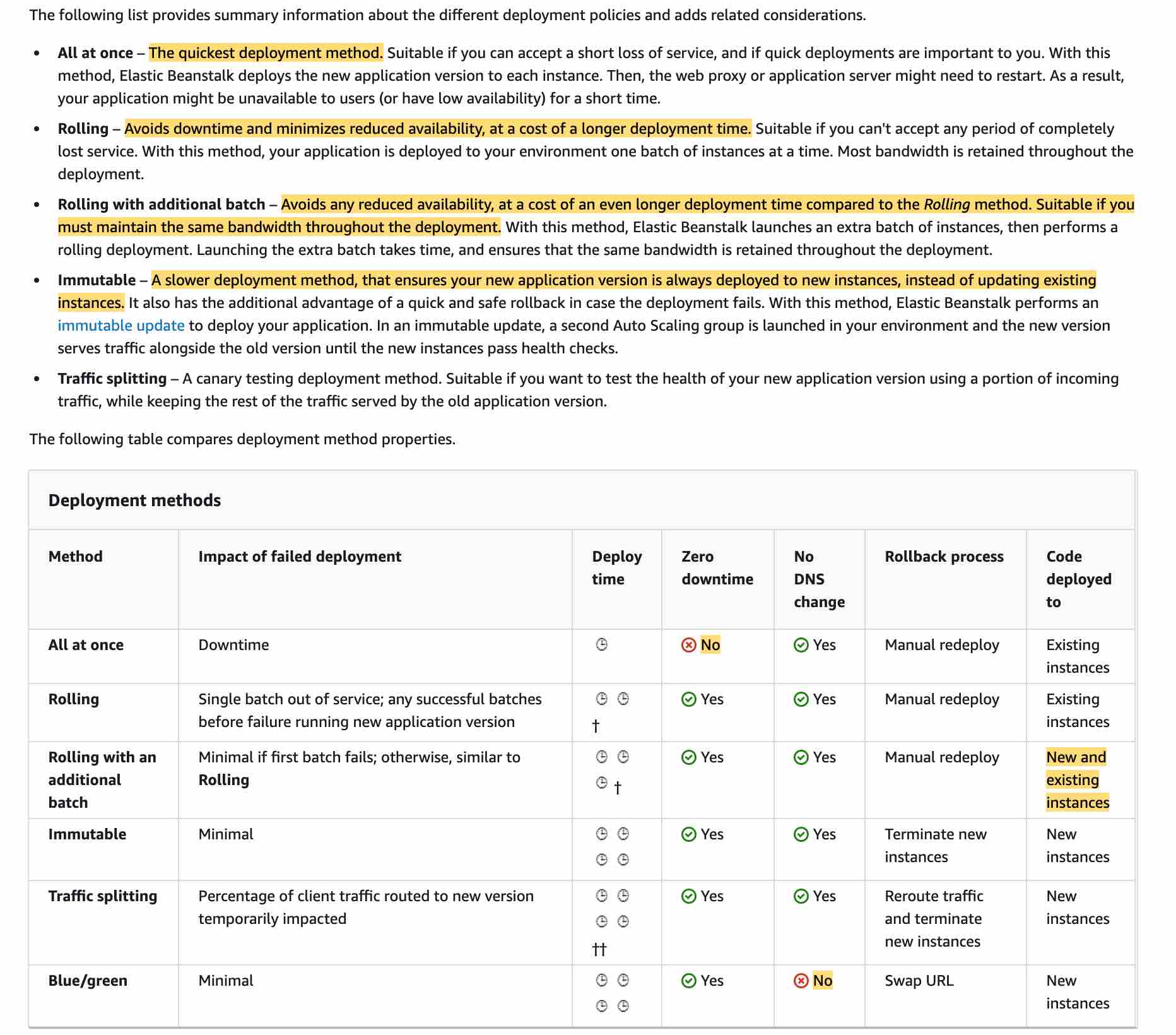
With deployment policies such as 'All at once', AWS Elastic Beanstalk performs an in-place update when you update your application versions and your application can become unavailable to users for a short period of time. You can avoid this downtime by performing a blue/green deployment, where you deploy the new version to a separate environment, and then swap CNAMEs (via Route 53) of the two environments to redirect traffic to the new version instantly. In case of any deployment issues, the rollback process is very quick via swapping the URLs for the two environments.
Overview of Elastic Beanstalk Deployment Policies:
Incorrect options:
Deploy the new application version using 'All at once' deployment policy - Although 'All at once' is the quickest deployment method, but the application may become unavailable to users (or have low availability) for a short time. So this option is not correct.
Deploy the new application version using 'Rolling' deployment policy - This policy avoids downtime and minimizes reduced availability, at a cost of a longer deployment time. However rollback process is via manual redeploy, so it's not as quick as the Blue/Green deployment.
Deploy the new application version using 'Rolling with additional batch' deployment policy - This policy avoids any reduced availability, at a cost of an even longer deployment time compared to the Rolling method. Suitable if you must maintain the same bandwidth throughout the deployment. However rollback process is via manual redeploy, so it's not as quick as the Blue/Green deployment.
Reference:
https://docs.aws.amazon.com/elasticbeanstalk/latest/dg/using-features.deploy-existing-version.html
Discussion
Think the marked answer is wrong, or have a better explanation? Share it below — comments appear after review.

